
3CX V20 Update 8 BETA is a big step forward—and yes, it’s all about AI-powered call handling. After the recent ALPHA release introduced the new AI chapter and enhanced AI Receptionist, this BETA builds even further.
With AI Call Screening across all apps, Boss–Secretary call handling, smarter AI Receptionist routing, and shared voicemail upgrades, Update 8 focuses on improving call control, routing accuracy, and daily usability. Add to that department-based Microsoft 365 sync and multiple system improvements, and you’ve got a seriously powerful update.
Let’s break down what’s new.
One AI Call Screening Experience Across All Apps
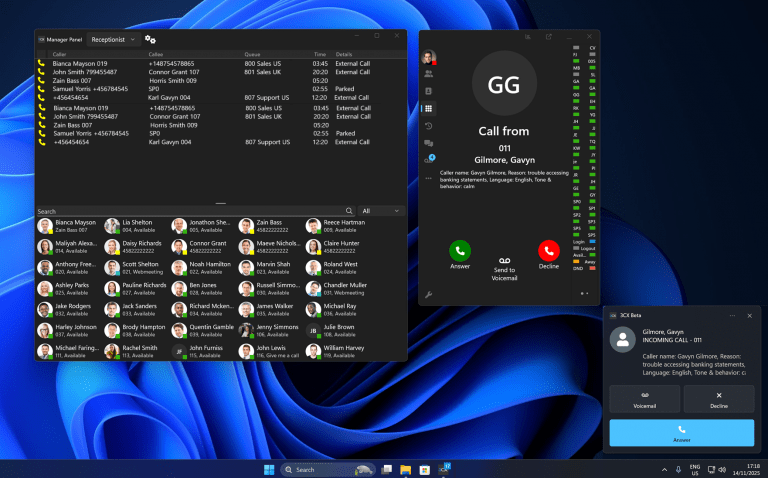
Starting with V20 Update 8, AI Call Screening now works consistently across all 3CX apps—Windows, Web Client, Android, and iOS.
No matter which device you use, the experience feels familiar and seamless. At the same time, the feature respects each platform’s privacy rules and technical limitations, ensuring full compliance with operating system requirements.
The result?
A unified call screening experience that works smoothly everywhere—without compromising security or performance.
Introducing Boss-Secretary Call Handling
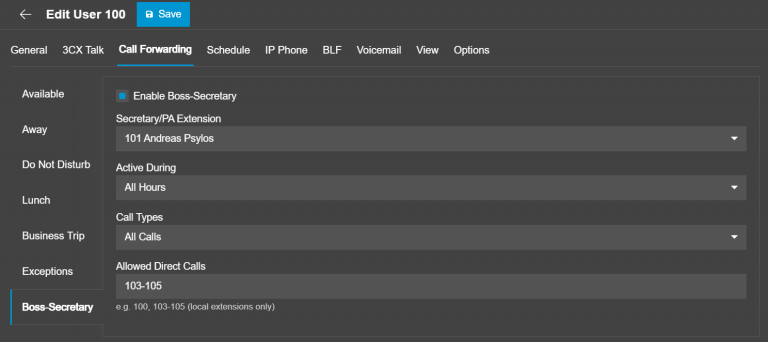
This BETA introduces a powerful new Boss–Secretary call-handling feature, designed especially for executives, managers, and personal assistants who need tighter control over incoming calls.
From the Admin Console, administrators can:
-
Assign a dedicated secretary or PA extension (human or AI Agent)
-
Choose when the feature is active
-
Define which calls it applies to—internal, external, or all calls
You can also add trusted internal users to an Allowed Direct Calls list, allowing them to bypass screening and reach the boss directly.
Most importantly, Boss–Secretary rules take full priority over all standard call forwarding rules. Once enabled, they override existing forwarding exceptions to ensure calls are always handled exactly as intended.
One Voicemail Inbox for Queues and Ring Groups
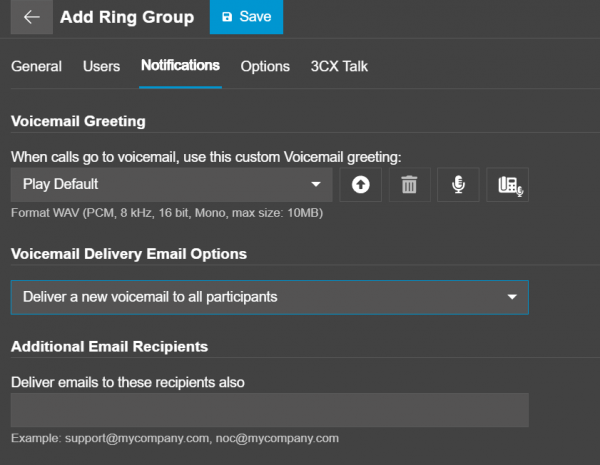
Shared voicemail gets a major upgrade in this BETA.
Previously, voicemail messages were emailed as WAV attachments to all members and immediately deleted from the system. There was no shared inbox, no tracking, and no way to see who listened to what.
Now, the new Shared Voicemail Box changes everything.
What’s new?
-
Two delivery modes:
-
Keep-and-copy
-
Attachment-and-delete
-
-
Option to send voicemails to:
-
A mailing list
-
Additional custom email recipients
-
-
Voicemails appear as standard shared messages, making them easy to manage and track
This makes voicemail collaboration clearer, smarter, and far more efficient.
Microsoft 365 Sync, Organized by Department
Managing users just got a lot easier.
Until now, 3CX pulled all users from Microsoft 365, forcing admins to manually select and organize them—time-consuming and error-prone.
With Department-Based User Sync, administrators can:
-
Sync users based on existing M365 groups
-
Automatically map users into matching 3CX departments
-
Keep everything aligned as group memberships change
Any updates in Microsoft 365 are picked up during future syncs, eliminating manual cleanup and ensuring consistent user management.
Next-Level AI Receptionist Features
The AI Receptionist in this BETA comes with several upgrades to make call routing smarter and daily use more reliable. Now, routing destinations save correctly, and the system can import more types of destinations, including:
-
Extensions
-
Ring Groups
-
Queues
-
Shared Parking
-
IVRs
-
Call Scripts
-
External Numbers
Key Highlights
-
Multi-language support: Administrators can set reply options for AI Agents. Choose single language or multi-language, so callers can switch languages if needed.
-
Better caller identification: Caller ID checks now work across all phonebooks—department, company, CRM, Google Workspace, and Microsoft 365—so trusted callers are recognized even if call screening is off.
-
Department-aware routing: AI Agents now know their departments. This means calls are routed more accurately, e.g., “I want to speak with Aaron in Germany ,” even if there are multiple Aaron in different departments.
New AI Tools
-
Transfer to Voicemail: AI can send callers straight to voicemail when appropriate.
-
Take Message (Chat Forwarding): AI can take a message from the caller and automatically forward it as a chat to the right person, making sure nothing is missed even when agents are unavailable.
Phonebook API & Department Support Improvements
The phonebook system now fully supports:
-
Company
-
Department
-
Personal directories
…and works seamlessly in Multi-Company Mode.
Admins get clearer control over contact sources, while users only see directories relevant to them. Import and bulk-delete actions now respect:
-
User roles
-
Department membership
-
Multi-company setup
This results in cleaner, safer, and more controlled contact management.
Other Fixes and Enhancements
Update 8 BETA also includes several system-wide improvements:
3CX AI Transcription
-
-
Better language detection and summaries
-
Alerts if the transcription engine goes down
-
Improved update process
-
Twilio API Improvements
-
-
More reliable bulk number creation
-
Hotel Billing Enhancements
-
-
Billing now references CDR output for greater accuracy
-
Telnyx & The Telephony Co VoIP Provider
-
-
Added back as a supported provider
-
Step Into Update 8 BETA
Want to try out these new features?
How to upgrade:
- Log in to the Admin Console
- Go to System > Updates
- Select Update 8 BETA
- Click Download
Important Note:
This is a BETA release and should be used for testing and evaluation only. It is not recommended for production environments.
Join Us and Talk with the Team
Have feedback or questions?
Join the conversation in the The Telephony co Partner or Customer Forums.
Follow The telephony co on LinkedIn to stay up to date with the latest news, updates, and feature releases.